Good pipeline. Bad execution.
Same outcome.

Built by a sales rep who lost deals because LinkedIn DMs never made it into the CRM.

Soufiane Zagouri, Founder

Book Pilot Call →

We walk you through pilot terms, find custom implementations for your org, then you decide.

Pilot Information

01 · Seats

5 Users Included

The pilot includes 5 seats to use it during the month — enough to run a real test across your team and see the impact at scale.

02 · Setup

No RevOps Debt

We handle the setup on our side from A to Z. Implementation is done in under 24 hours. We upload some of your org's successful calls and emails to make model powerful from day 1.

03 · Integration

CRM-Native

Completely native in your sales engagement tool — no training on a new UI. Your reps work exactly where they already work.

HubSpotSalesforceOutreachSalesloft
04 · Pricing

Founder's Pilot Pricing

$700

For the full pilot duration (1 month). Covers custom implementation cost, training, usage cost, and direct 1-on-1 calls support.

Note: All your calls, emails, and LinkedIn DMs data have enterprise level security and are not used for any global training, they are only used for your own sales org.

The Silent Killers

Pipeline doesn't die.
It quietly erodes.

Multi-threading is Performative, Not Strategic

Under pipeline load, it becomes a checkbox — just enough to call it done until the champion churns.

The "Dark Funnel" Blindspot

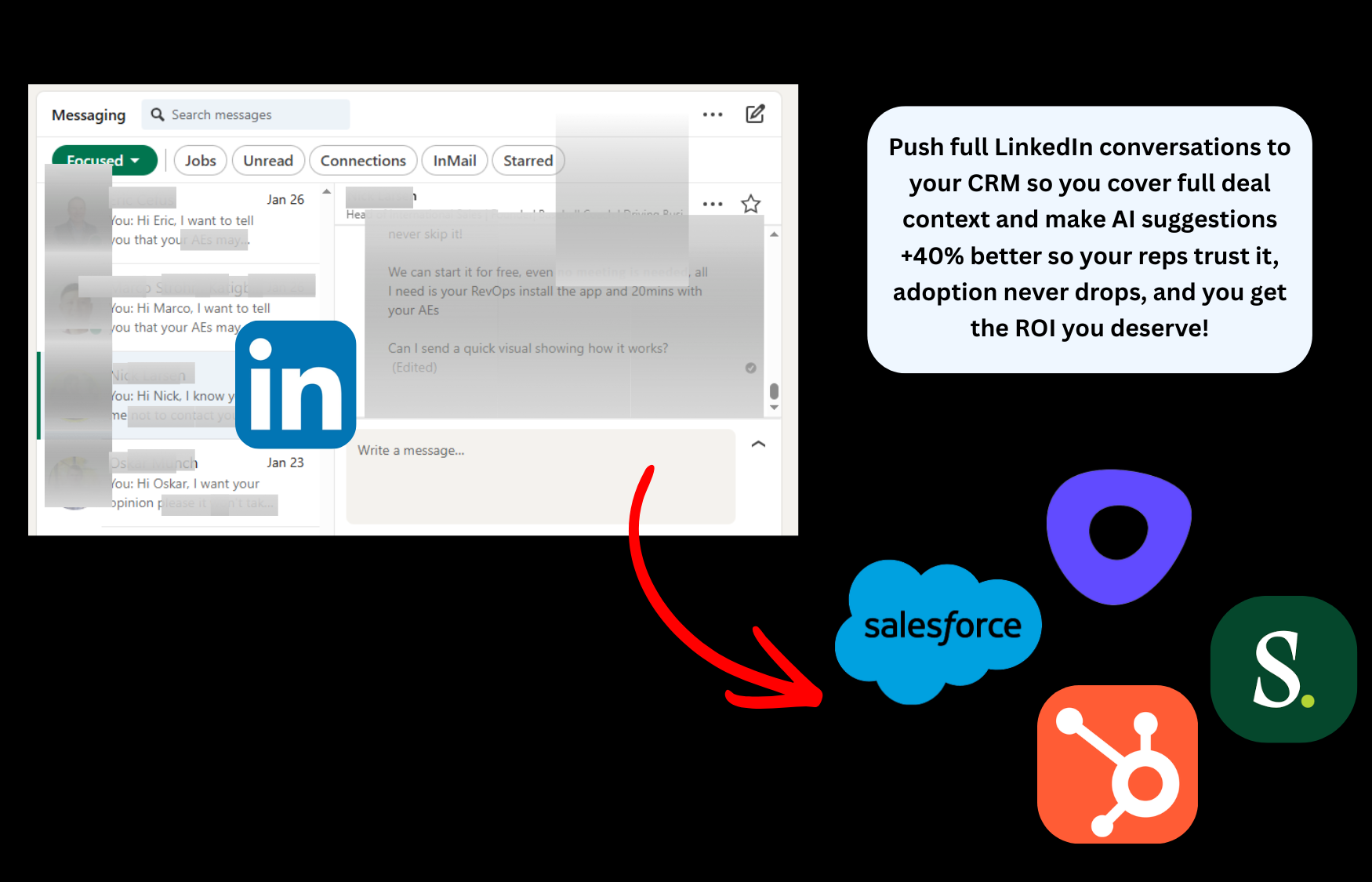
LinkedIn DMs are where deals actually start — and your CRM has never seen a single one of them.

SDR-to-AE Handoff Erases Context

Every objection, every signal, every nuance the SDR built up — gone the moment the deal transfers.

Coaching Erosion: Top Performers Slip

Great habits degrade quietly. By the time it shows in the numbers, the damage is already done.

Included in every seat

What Your Reps Get in Pilot

★ New · LinkedIn Capture

Every LinkedIn DM,
inside your CRM.

Every LinkedIn conversation your reps have is automatically available in your CRM — fully searchable, fully part of the deal. No manual logging. The conversation that started the deal is finally part of the deal. Plus: SDR messages surface automatically at handoff, so AEs never lose context.

★ Full thread history · Automatic · Zero friction
What this means for revenue

Your reps are already having conversations on LinkedIn that win and lose deals. Until now, that context was invisible. With every DM captured automatically, every follow-up is sharper and every handoff is cleaner.

LinkedIn DM thread
★ New · Auto-Created Tasks

Auto-Created Tasks —
Only When It Actually Matters.

On a custom basis, RevMighty reviews each open deal and makes a task ONLY if it makes sense: bring in a new stakeholder who can move the needle, follow up with an existing contact, or just nothing. When a new persona is worth pursuing, the task comes pre-loaded with their email and LinkedIn — no research required.

★ Weekly AI review · Pre-enriched contacts · Rep-controlled
What this means for revenue

The average AE loses hours deciding who to contact — and still misses deals going cold quietly. RevMighty eliminates that loop. Reps show up to a precise list of which deals need action, pre-enriched with who to contact and what to say.

Weekly Deal Review — Clay · Enterprise
New Stakeholder Recommended
Bring in VP of Finance
Budget approval likely required at this stage. Sarah Chen · linkedin.com/in/sarah-chen · [email protected]
Deal: TechFlow Inc
No action needed — engagement healthy, follow-up on track.
Accept task
Dismiss
01 · Script Generator

The right message,
built on full context.

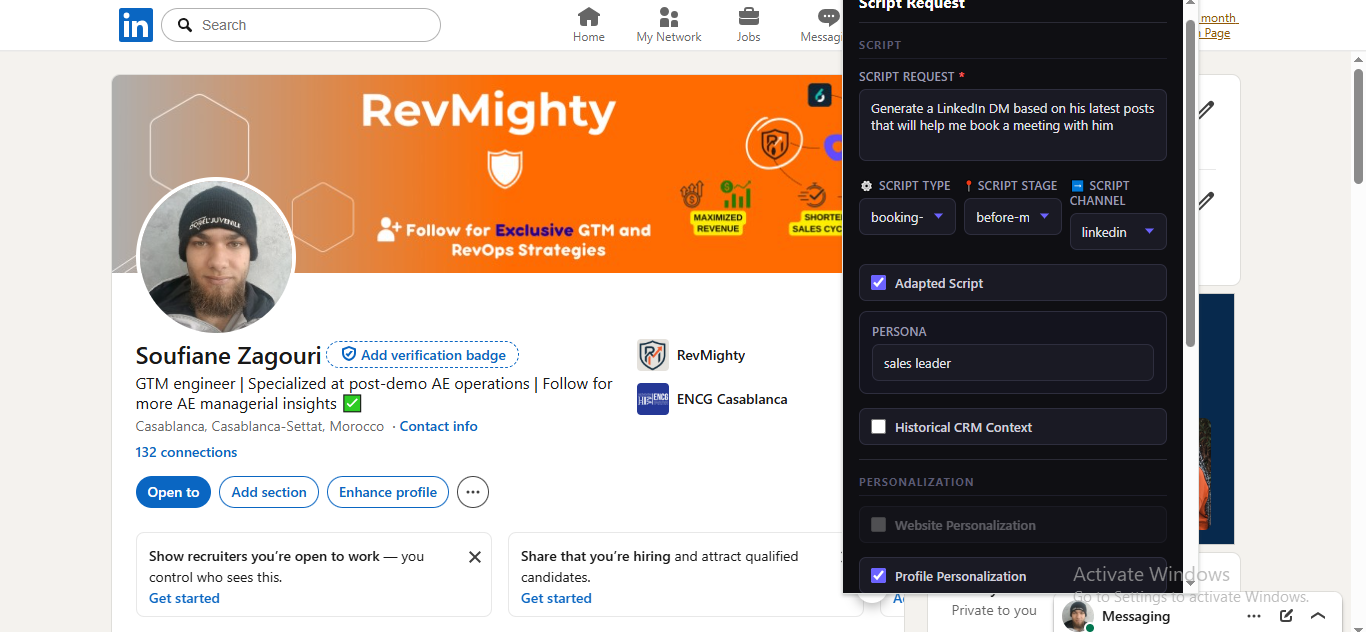
As your rep browses a prospect's LinkedIn profile, RevMighty generates a personalized outreach script — based on their persona, the deal stage, and the full conversation history including past LinkedIn DMs. No tab switching. Scripts that work because they know the whole story.

✓ LinkedIn context + CRM history combined
What this means for revenue

Generic follow-ups kill warm deals. When your rep's message references the prospect's exact concern from three weeks ago — right stage, right tone — reply rates go up. Personalization at scale that actually converts, not templates pretending to be personal.

Script generator
★ Coaching Intelligence

Stop coaching erosion.
Objective rep performance metrics.

Every call and message is scored — on what moves deals (thoughtful questions, education, next steps) and what kills them (pushiness, overpromising, defensiveness). Trends per rep, over time. Managers catch slippage before it hits pipeline.

★ Automated scoring · Per-rep dashboards · Slack alerts
What this means for revenue

Top performers don't fall off overnight — habits erode slowly. A rep who used to score 8.5 on "educating" now averages 6.2? You get the alert, pull the call snippet, and course-correct in minutes. Your best reps stay your best reps.

📊 Call quality scores (1-10) · last 30 days Team: AEs | Rep: Joe Davis
Positive metric (higher = better) Negative metric (lower = better) ● Neutral / baseline
based on 47 calls · consistent tracking across recent activity
02 · Q&A Engine

Ask anything about
any contact.

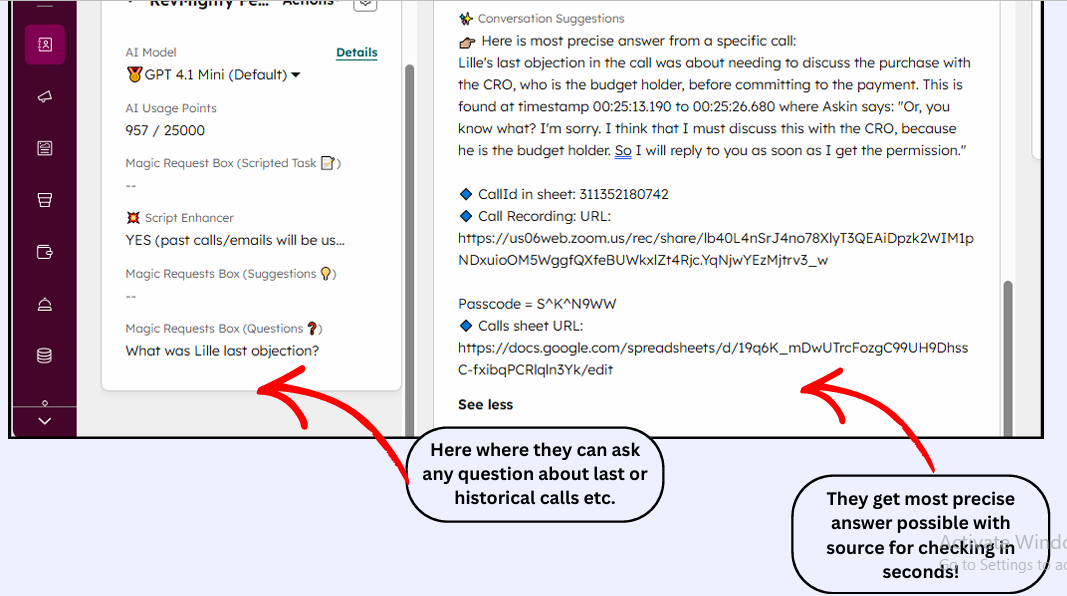
Type a question in your CRM — "What objections did they raise?" or "Did they mention a competitor?" — and RevMighty searches every recorded call and email, finds the answer, cites the exact recording, and pushes it to your rep's Slack in seconds.

✓ Answer delivered to Slack with call recording link
What this means for revenue

Every rep has lost momentum rewatching a 45-minute recording to remember what a prospect said about budget three weeks ago. With Q&A, that answer arrives in Slack in seconds — with the exact timestamp to back it up.

Q&A Slack

Will my reps LinkedIn accounts be at risk?

👉🏼 LinkedIn only bans accounts when they use headless bots or they send lot of connection requests or messages automatically, we do none of that! We only read pages content via DOM extension which is ~0 risk.

The Definitive Breakdown

Three platforms. One that actually does the work.

An objective breakdown of where RevMighty focuses compared to legacy Revenue Intelligence tools.

CapabilityGongSybillRevMighty
DATA CAPTURE
LinkedIn DM capture
Logs dark-funnel social selling conversations
✕ Completely blind ✕ Completely blind ✓ Yes
  • Chrome extension logs messages, gets updated when LinkedIn changes UI
Call transcript ingestion
Records and transcribes video calls
✓ Yes ✓ Yes ✓ Yes
Email thread tracking
Ingests sent/received email
✓ Yes ✓ Yes ✓ Yes
  • Attributed per contact in deal timeline
SALES EXECUTION ASSISTANCE
Sales activity drafts
Demo, calls, follow-up drafts to follow-up on open deals
~ Yes—email only ~ YES—email only ✓ Email, Call & DM
  • Email, call, and DM scripts your rep can use!
  • Custom suggestions from AI they love by copying giant deal summaries that include your product description!
Personalization
To what extent does the tool personalize your drafts
~ Moderate
  • Call and email conversations only
~ Moderate
  • Call and email conversations only
✦ Extreme
  • Uses LinkedIn DMs, emails, & calls for 360° context
  • Uses profile posts for enhancing cold/re-engagement emails
  • Uses website content for core offer personalization
  • Learn from recent successful calls/messages with same persona
Buying-Committee insights
Helping rep engage more personas per account
✕ No ✕ No ✦ Yes
  • Enrich any profile they are browsing in LinkedIn
  • Find for reps other members of buying-committee without having them to do it
Answering deal questions
Helping rep quickly get old deals' context
✓ Great
  • Jumps your rep to the exact second where the question's answer lies in a call
  • Give reps call summaries
~ Partial
  • Give reps call summaries
  • Ask-Sybill can answer across deals but precision/depth varies
  • Often no timestamped answers
✓ Yes
  • Answer deal questions while extracting exact second where reply lies
  • Answer AE questions about objections that happened in SDR LinkedIn conversations
  • Give chronological deal summaries so full context is grasped in seconds
Lives fully inside rep Workflow
No tab-switching; rep never leaves his current sales tab to get drafts/answers
~ Partial
  • Can only use it out of Gong in Gmail to get drafts, but not in sales engagement tool (or CRM), nor in LinkedIn natively
✕ Going to Sybill is necessary
  • Can't request drafts/suggestions in sales tools
✓ Yes
  • He requests & gets the drafts & suggestions in his CRM/LinkedIn
  • He gets new committee members enrichment in CRM/LinkedIn
  • Even call questions can be requested & answered in LinkedIn extension
AI DECISION ENGINE
Autonomous deal suggestions
AI decides AND alerts — rep remains in control
✓ Yes
  • Appears in Gong engage
✓ Yes
  • In Sybill's UI
✓ Yes
  • Right in your CRM tasks board
Respects 'don't contact' signals
to avoid task spam Detects explicit prospect boundaries, while re-engaging accordingly
✕ No
  • Doesn't spam, but doesn't recheck deals
✕ No
  • It may not spam reps but it doesn't re-check deals regularly
✓ Yes
  • Detects 'freeze budgets until Q3' → outputs 'no task for now'
  • When Q3 arrives and rep forgot about it he gets the task
Closed-won pattern matching
Learns from past wins to guide current deals
✓ Yes
  • They have their model learning from your closed deals patterns, your wins and losses
✓ Yes
  • They have their model learning from your closed deals patterns, your wins and losses
✓ Yes
  • Queries closed-won deal summaries
  • Feed them to task engine for pattern recognition
  • Feed task script generation successful calls/emails with same persona
Rep control
Control over what type of tasks rep is willing to take, how often, ability to shut it down
✕ No ✕ No ✓ Yes
  • Rep can define weeks gap between each time AI analyzes deals for a task
  • Rep can choose what type of tasks he doesn't want (e.g NO «add persona» tasks)
  • Rep can exclude specific contacts/deals from getting tasks
COACHING
Automated call performance scoring
Multi-metric rubric evaluated per call
✓ Great
  • Talk ratio, keyword tracking, team-level trends
  • Coaching scorecards (custom)
  • Manager insights per rep
~ Partial
  • More about the call itself (talk-ratio, engagement)
  • Doesn't delve into rep performance itself
✓ Yes
  • 6+ core metrics: pushiness, clarity, education, next steps…
  • AI notes about what rep could've done better in a call
  • It is deal-stage aware, rep won't be penalized on metrics that don't matter there
Automated message performance scoring
Multi-metric rubric evaluated per email/DM
✕ No ✕ No ✓ Yes
  • 5 core metrics: conciseness, CTA, warm tone…
  • Vanity «thank you» emails/DMs don't get analyzed
  • Only hard emails/DMs that move deals get analyzed
Exact quote + timestamp feedback
AI cites the specific moment where rep erred
✓ Yes
  • Gong tells Manager when that happened
✕ No ✓ Yes
  • RevMighty tells manager when that happened
Instant Slack delivery
Rep performance feedback sent privately while context is fresh
✓ Yes
  • Needs RevOps work
✕ No ✓ Yes
  • Private Slack DM with full justified call report
Coaching Dashboards
Reports showing reps' performance across recent calls/emails
✓ Yes ✕ No
  • Not «rep performance» reports
✓ Yes
Pricing & Plans
Pricing model
How you're billed
  • $130+/seat
  • Bundled modules, multi-year contracts
  • $30-90/seat
  • $90 plan is the only functional plan for AEs
✓ $90 per AE, everything unlocked
  • $65 per SDR
  • $50 per admin/manager
  • RevOps implementation cost: «free»
Onboarding time
Time before a rep derives value
  • ~ Days
  • Dedicated RevOps setup required
  • Days
  • CRM field mapping needs configuration
✓ Under 24 hours implementation & training on our behalf
Book Pilot Call →

We walk you through pilot terms, find custom implementations for your org, then you decide.